The content in this preview is based on the last saved version of your email - any changes made to your email that have not been saved will not be shown in this preview.

View as Webpage

November 2023 HMIS Agency Admin Eblast

hand_logo_white.png

Good Morning,


We are providing this HMIS Agency Admin Eblast in lieu of this month’s Agency Admin meeting which has been canceled. In terms of getting credit for attendance, we will use the distribution of today’s Eblast as your proof of participation. In other words, you will all be marked down as ‘attending' the November 2023 meeting by way of this Eblast.

Regulatory Reporting Requirements

Chart Graphic

Longitudinal System Analysis (LSA) for Shelters and Transitional Housing

  • The LSA is upon us and the HMIS team will be reaching out to you if there are any updates or work that needs to be done on the providers side. We will be in contact if certain errors need to be fixed and we will need to respond within a timely manner so we do not get behind on submitting. In the months to come, please be on the look out for any emails that the HMIS team at HAND sends to you.
  • Shelters and Transitional Housing please run a client location error report for 10/1/2022-9/30/2023 and fix the clients that don't show MI 501 as the location and a Discharge destination report for 10/1/2022- 9/30/2023 and review and/or update any “Don’t Know” & “Other” destinations. Please put in a help desk request if you have any questions.


ESG CV CAPER Reporting Reminder

Providers that will be spending any ESG-CV funds in the timeframe of 10/01/2023 – 12/31/2023 will have to submit their clean CAPER data report to HAND in January 2024. Guidance and details from HAND will be sent out soon regarding clean CAPER report submissions.

Unsheltered Point-in-Time Count Reminder

Planning for the unsheltered PIT has begun. The sheltered date is January 31, 2024. The planning team is meeting regularly and Elise Grongstad is the coordinator and primary contact person for this initiative. Be on the lookout for more information on:

  • How to sign up for PIT count teams
  • Known Locations
  • Etc.

Q3 Housing Move-in Date Audit Exercise

The Q3 Housing Move-in Date Audit Exercise is well underway. This exercise is completed for all RRH & PSH providers on a quarterly basis. It helps to ensure accurate reporting of the total clients housed during the last quarter as well as the average length of time to housing. The information obtained during the exercise is also used to update the quarterly bed and unit inventory information in HMIS for all RRH projects.


We would like to thank those providers that successfully completed the exercise and submitted their HMD Audit reports (with comments included) by the November 15, 2023, deadline. For those of you who have not yet submitted your HMD Audit reports, this is a friendly reminder to get them in today!


Quarterly Housing Move-In Date Schedule (for future reference):

Emails generally go out during the first week of the month and providers are given approximately two weeks to review the reports, make corrections, and submit the final spreadsheets with the requested status update notes. 


Audit Exercise Completed Time Period Covered

  • February for November-January reporting period
  • May for February-April reporting period
  • August for period of May-July reporting period
  • November for August-October reporting period

Insight on the Agency Quarterly Audit Exercise

The Quarterly Agency Audit Spreadsheets for Quarter 3 covering 10/1/2022-

9/30/2023 were due November 1, 2023. We would like to thank those providers who successfully completed this exercise by the deadline as requested.


Your cooperation and participation in this exercise is not only appreciated but is also essential in ensuring the integrity of your HMIS data. Remember, to provide accurate and relevant data to the Detroit CoC, it is imperative that the HMIS maintains an on-going process of quality improvement. This quarterly audit exercise is an important step in that direction.


Although the next quarter’s reporting period is scheduled to end on 12/31/2023, we highly recommend you focus on addressing data quality errors at least monthly.


Any questions on these efforts need to be addressed by contacting the HMIS helpdesk.

SSVF Repository Update

WellSky has been informed that as of last week the SSVF Repository has been updated to accept a null value in the Enrollment CoC column in the HUD CSV for non-head of household clients. Null values in this field will no longer cause an upload rejection. Please note that clients with no Enrollment CoC value will still flag in the Data Quality section of the report. Per the SSVF help desk these flags can be ignored and will not appear in the report during the next submission period.


If you have any questions about this, please reach out to the HMIS helpdesk.

IMPORTANT HMIS REMINDERS!!!

Protecting Client Information

Securely submitting Merge Requests

For the past 2 months, there have been a number of Merge Requests submitted improperly. All Merge Requests are to be submitted on the official Merge Request spreadsheet found on the HAND website here


DO NOT ADD ANY CLIENT IDENTIFYING INFORMATION IN THE TICKET'S DESCRIPTION FIELD!!!

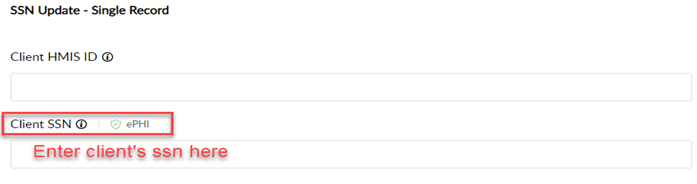
If there is ANY client PPI data in the request, i.e. SSN, the merge request form must be password protected.

Updating Client SSN's

When requesting an update to a client’s SSN, the SSN must be entered into the encrypted field of the HelpDesk ticket, if for only one client.

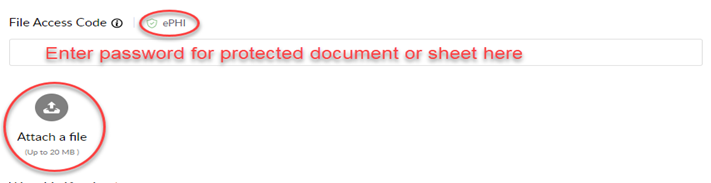
When submitting for multiple clients, then a password=protected document is required, to protect the clients’ sensitive data.

If you are unfamiliar with how to password-protect a document, the process to protect an Excel spreadsheet is the same as a Word document. Here is a link to walk you through the process in under a minute.  Just remember your password and enter it in the HelpDesk field “ADDITIONAL INFORMATION – File Access Code ePHI” as shown above. We will not be able to open your protected file without a password provided.

User Licensing Requirements

New User Licensing

We have a very defined process that needs to be followed before we can grant new user licenses. This process includes having your new staff:


  1. Download the HMIS New User License Worksheet from our website and follow the guidance provided in the worksheet to identify the training requirements needed for their license type.
  2. Complete the MCAH HMIS Learning Center Foundational Training Courses as identified in the above-referenced HAND HMIS New User License Worksheet. (Note: when accessing this site for the first time, make sure to follow the instructions in the HMIS Learning Center New User Guide to get started. Also, make sure you have them Join Group using MI-501 as the CoC code.
  3. Download their certificates of completion and record their training completion dates on the worksheet.
  4. Download, read, and sign the User Agreement and Code of Ethics form from our website. Once signed, they need to pass the Worksheet and User Agreement to you as Agency Administrator to finalize. This includes completing all remaining fields on their Worksheet (including their title/role, phone number, program(s) they will be involved with, Default bin & EDA access). You then need to send the completed worksheet, certificates, and user agreement back to us via a helpdesk request.


Once we receive this initial paperwork from you, we will verify their information and provide further instruction on (and access to) HANDS own training site to complete the additional HAND specific training requirements. These trainings are outlined in the HAND HMIS Training Worksheet and include the Detroit CoC HMIS Operating Policies and Procedures. All other trainings are identified by job role/function. Additional courses will be added to this worksheet as they become available.


For more information, refer to the minutes from our October 2023 Agency Administrator Meeting.

User Recertification Requirements

As you can see in the MCAH LMS Training Catalog that we referred to in our October Agency Admin meeting, we are only requiring Privacy and Security Training to be completed on an annual basis. This includes course 001: Client Privacy and Data Security Essentials (for all users) and 301: Advanced Privacy and Security Training (for Admins). However, please note course 301 is not yet available. We are also evaluating the potential for additional recertification courses in the future, but for now we are only requiring the above-referenced courses.


This training is completed through the HMIS Learning Center.  (Note: when accessing this site for the first time, you will need to create a new account and make sure to follow the instructions in the HMIS Learning Center New User Guide to get started. Also, make sure you have them Join Group using MI-501 as the CoC code

Once this training is completed, the certificate(s) will need to be downloaded and sent back to us via helpdesk ticket.